Back to School Gamepads Papers Set
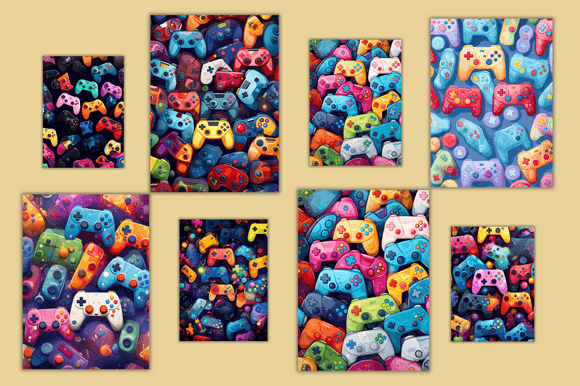
If you're designing classroom handouts, student activity sheets, or themed digital planners for the new school year, the Back to School Gamepads Papers Set offers a playful, modern twist on traditional educational printables. It’s not clipart or generic borders—it’s a cohesive collection of 12 high-resolution digital papers (8.5×11 inches), each infused with subtle gaming-inspired motifs: pixel accents, controller silhouettes, and retro-futuristic textures—all softened with school-appropriate palettes like navy, sage, warm gray, and muted teal. Designed for educators, curriculum designers, small business owners selling printable resources, and even parents building personalized learning kits, this set bridges engagement and practicality without sacrificing professionalism.
What People Often Misunderstand About Digital Paper Sets
Many assume “digital papers” are interchangeable with background images—or worse, that any colorful JPEG will do the job. But digital papers are specifically engineered for layering, printing, and consistent scaling. The Back to School Gamepads Papers Set delivers true seamless repeats and optimized resolution (300 DPI), meaning when you tile it behind text in Canva or overlay it in Adobe InDesign, edges won’t misalign and fine details won’t blur. That’s why using a random screenshot of a game UI or resizing a low-res PNG often leads to pixelation, uneven tiling, or washed-out colors—especially when printed on standard office paper.
Another common oversight? Assuming color accuracy is guaranteed. While all files in the set are high-resolution, your monitor’s calibration, browser rendering, and printer settings significantly affect how navy blues or soft grays appear. One educator reported disappointment after printing 50 copies of a welcome letter—only to find the “teal” paper looked more olive than intended. This wasn’t a flaw in the files; it was an unaccounted-for variable in her workflow.
How File Format & Workflow Choices Impact Real-World Use
The Back to School Gamepads Papers Set ships as a single ZIP file containing 12 individual JPGs. That’s intentional: JPGs load quickly, open in virtually any program (from Microsoft Word to Procreate), and maintain reliable color fidelity across platforms. Yet some users immediately convert them to PNGs “for transparency”—not realizing these papers aren’t meant to be layered *over* other elements, but used *as* backgrounds. Adding transparency where it isn’t needed increases file size unnecessarily and can introduce compression artifacts if re-saved multiple times.
Similarly, trying to edit individual design elements—like isolating a controller icon to move it—isn’t possible here. These are flattened, ready-to-use papers, not layered PSD files. If your goal is custom illustration placement, this set supports that only through proper composition tools (e.g., placing text boxes over the paper in Canva or setting the paper as a page background in Google Docs). Expecting editable vectors from a digital paper pack sets up frustration—and delays.
What to Check Before You Download or Print
Before opening that ZIP file, take two quiet minutes to verify three things:
- Your software supports JPG backgrounds at full resolution. Most modern tools do—but older versions of Word or free PDF editors sometimes downsample images automatically. Test by inserting one paper into a blank document and exporting as PDF. Zoom to 200%: edges should stay crisp, not fuzzy.
- Your printer handles 300 DPI well. Inkjet printers vary widely. If yours tends toward oversaturation, try printing a test sheet on plain paper first—especially if using darker papers like the charcoal-gray option. Matte paper often renders richer tones than glossy for this style.
- You’ve confirmed your use case aligns with licensing. This is a personal and small commercial license: you may use the papers in your own lesson plans, client deliverables (e.g., a tutoring business’s weekly planner), or physical products you sell (like printed workbooks)—but not as standalone digital assets for resale (e.g., bundling them into *your own* paper pack for Etsy).
Better Ways to Apply These Papers—Without Overcomplicating Things
Start simple. Use one paper as a full-page background behind a clean sans-serif title (“Welcome Back, 4th Grade!”) and bullet-pointed supply list. That alone adds visual cohesion without demanding design expertise. For educators building interactive PDFs, set the paper as the base layer in Acrobat Pro, then add clickable buttons or fillable fields on top—no extra plugins needed.
Freelancers designing branded resources for schools often make the mistake of over-layering: adding shadows, borders, *and* watermarks on top of an already textured paper. Instead, let the paper do the work. Choose one paper with subtle contrast (like the light gray with faint pixel grid), then use bold, dark text only—no extra effects. Clarity wins every time.
And if you’re sourcing for a team? Share the ZIP file directly—not screenshots or renamed copies. That preserves metadata, avoids accidental resampling, and ensures everyone uses the original, unaltered files. One curriculum coordinator saved hours after switching from emailing “final” JPGs to granting shared cloud access to the master ZIP. Version control matters, even for papers.
A Note on Realistic Expectations—and Why They Matter
Digital papers aren’t magic wands. They won’t fix disorganized content, compensate for unclear instructions, or replace thoughtful pedagogy. What they *do* well is reinforce tone and intention—making a multiplication practice sheet feel inviting instead of intimidating, or turning a behavior chart into something students actually look forward to filling out.
If your goal is speed, consistency, and subtle thematic resonance—not complex customization—the Back to School Gamepads Papers Set delivers exactly that. It’s built for people who value time, appreciate restrained design, and understand that the best educational tools don’t shout; they support.
So before you open that ZIP, pause just long enough to ask: What am I designing—and for whom? Then choose the paper that quietly matches that purpose. No extra steps. No guesswork. Just 12 thoughtful starting points, ready when you are.